Monday, November 24, 2008

Books

I've made a couple of books available off of my website

portfolio_book_p1.jpg


I did one on Blurb the other one using Apple's Aperture program.

Blurb definitely makes selling easier and at some level I liked the output better (slipcover on the hardcover version), but Aperture gave me more flexibility around background images etc.. That flexibility also made Aperture easier to use, although getting a result that I liked was harder aka too few constraints.

A how-to note: I created the flash file by printing a PDF in Aperture and then running it through swftools using the instructions on Tao of Mac on how to build swftools, and then disabling the print/zoom/etc menu by following this Oct 2007 post by WorldCrafter

Tuesday, November 11, 2008

New Sculpture

A small sculpture I recently finished


Unititled_IV_2008_small.jpg

Monday, October 27, 2008

Barcelona Favorites

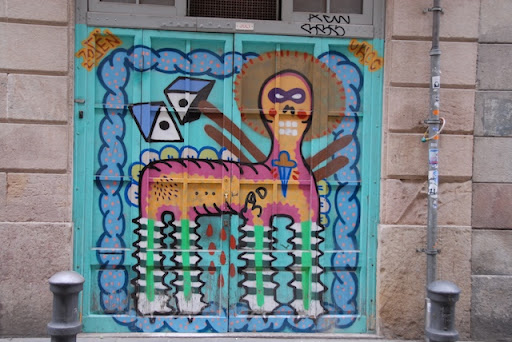
After Madrid, I went to Barcelona -- here's my favorite street art.

These two were in the professional/commisioned range

barcelona_s014.jpg


barcelona_s106.jpg


This one was more "of the street" I saw similar work in a few places

barcelona_s082.jpg

Monday, October 20, 2008

Madrid Favorites

Here's my three favorite street art pieces in Madrid -- not saying that they were the best in the whole city, just the best ones that I came across.

madrid_  106s.jpg


madrid_  128s.jpg


This one is definitely my favorite -- I really like the "rivet" effect.

madrid_  127s.jpg


Tuesday, October 14, 2008

Madrid

I was recently in Madrid and was surprised at how much street art there was -- more than anyplace else I had been.

This is a heavily decorated park

madrid_58s.jpg


madrid_59s.jpg


An example corner.

madrid_55s.jpg


detail

madrid_56s.jpg


There also appears to be a free mixture of 'sponsored' and 'spontaneous' work. This shot is directly across the small street from the corner.

madrid_57s.jpg

Tuesday, September 30, 2008

NYC Subway

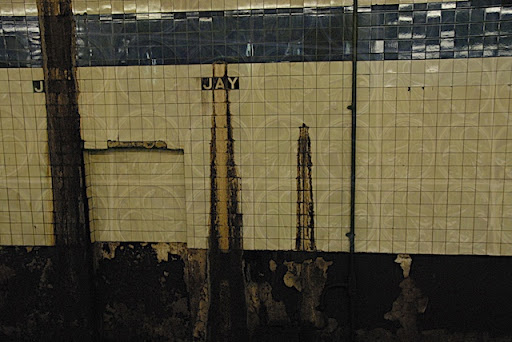
I initially shot this set looking for textures and backgrounds to use for photoshopping but I ended up with a few shots that stand on their own -- well "on their own" in photoshop with Tiffen 2.0 filters.

The Tiffen 2.0 filters are a substantial improvement over the 1.0 version. They allow multiple layers and individual layer "transparency" control. My current workflow involves keeping layers of my favorite filters up in the "Effect" pane. I keep them turned off but can quickly turn them on without having to wade through the filter selection hierarchy (which I'm sure is clear if you shoot with a lot of real physical lens filters, but isn't the point of this package that you shoot first and filter later?).

ceiling_drain_3.jpg


signal.jpg


jay_st.jpg


BTW Version 2.0 is a bit crash-happy on OSX 10.5.5, but I'm getting in the habit of doing a quick save before calling up the filters.

Monday, September 15, 2008

What I did with the stacked pipe slices

I'm pretty happy with the way this turned out

Detail

2008_untitled_III_v3.jpg


Full view
2008_untitled_III_v1.jpg